


Gospel Library
4.727.62K Reviews
App Specs
- Version
- 7.7.4-(774002.3318603)
- Updated On
- License
- Free
- Downloads
- 10,000,000+
- Developer
- The Church of Jesus Christ of Latter-day Saints
- Categories
- Books & Reference
- Platform
- Android, iOS
Screenshots
 Analysis by AppCompare
I often reach for a scripture or Church talk in a very ordinary moment: a few minutes before a meeting, a quiet break, or a question that comes up in conversation. That is where Gospel Library makes sense to me. It is a free reading and reference app from The Church of Jesus Christ of Latter-day Saints, built around the Church’s own materials rather than a general-purpose Bible collection. If those are the sources I want to study, having them gathered in one place is useful; if I want a broad interfaith reference tool, I would look elsewhere.
When a connection changes the experience
The app’s usefulness can depend on whether the material I want is ready on my device or needs to be reached online. That distinction matters more than it might seem: a planned study session is easy to prepare for, while an unexpected question during a commute may arrive before I have checked what is available locally. I treat downloading chosen reading as part of getting ready, not something to leave until I am already in a low-signal place.
For a lesson or talk I know I will revisit, I would open it while connected and make sure the content is available before heading out. For browsing broadly, searching unfamiliar topics, or moving between different media, a stable connection makes the experience more straightforward. This is a practical habit rather than a guarantee that every item behaves the same way offline.
A useful companion in small pockets of time
The format suits brief, interrupted reading. I can look up a passage while waiting, read a few paragraphs during a break, then return to a longer session later. Audio and video make it possible to engage with conference material when looking at a screen is awkward, although that kind of listening works best when I have already chosen what to play and considered my connection and surroundings.
One realistic routine is to prepare for a Sunday lesson at home, use a saved passage to check a detail on the way, and return to the same study thread when I have a quieter moment. The app is less suited to someone who wants a distraction-free, single-purpose e-reader: its range of publications and media can invite browsing when the goal was only to read one short text.
What I do when loading or syncing gets in the way
If a page or media item does not appear promptly, I first check whether I am relying on a connection, then try again somewhere with better service or return to material I prepared earlier. For study notes I care about, I avoid making a device change at the last minute and confirm that my work is where I expect it to be. Sync is helpful when it works across a study routine, but I would not treat a new device or an interrupted connection as the moment to discover how my setup behaves.
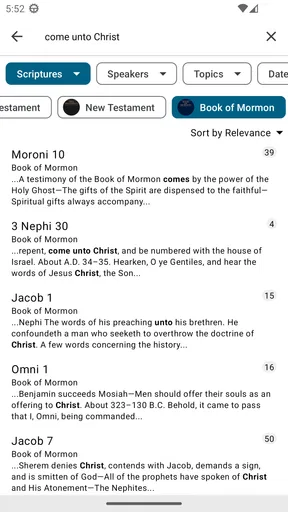
That modest preparation is the main trade-off I notice. A large collection is valuable, yet it can make the app feel less immediate if I am not sure where a specific item lives or whether it is ready to open. Searching by a phrase I remember, rather than browsing every section, is often the quicker route; saving a passage I use often also reduces repeated hunting.
Worth Reading Before You Choose

Flipboard Shows What News Apps Must Do Beyond the Feed

Switching to Android Auto Means Rethinking Your Driving Routine

Google Calendar Makes a Crowded Week Easier to Manage

Ludo King Makes the Most of the Minutes Between Plans

Baby Panda World Brings Quick Play to Modern Phones, but Its Game Library Feels Busy

ESPN’s Live Game View Makes Following Close Games Easier
Keeping mobile use intentional
Because this is a substantial collection, I would be selective about what I keep ready for travel instead of trying to prepare everything. I choose the scriptures, talks, or lesson material I actually expect to use, and do broader exploration when I have a reliable connection. That approach is useful for anyone mindful of mobile data, storage, or the inconvenience of waiting for content to load, without assuming every resource has identical download behavior.
It also helps to separate reading from preparation. If I am responsible for leading a discussion, I can identify the relevant text and notes in advance rather than depending on a quick search while everyone is waiting. If I am simply browsing for personal interest, I have more freedom to follow a topic and accept that online access may shape how smoothly I move through the collection.
Who will get the most from it
I think this is a strong fit for Latter-day Saints who regularly use Church publications, prepare lessons, revisit conference talks, or want scripture study and related media together. It can also suit someone exploring these teachings who wants a direct route to Church materials. By contrast, readers who mainly want a neutral Bible study app, extensive tools for comparing many translations, or a minimalist reading interface may be happier with a different reference app.
Compared with keeping separate reading apps, saved web pages, and media sources, Gospel Library has the advantage of bringing Church-focused material into one place. The trade-off is that its breadth can take a little orientation, and it is not designed to be a general library covering every religious tradition. I would start with one clear task—finding a passage, following a talk, or preparing a lesson—before exploring the rest.
Getting Started with Gospel Library
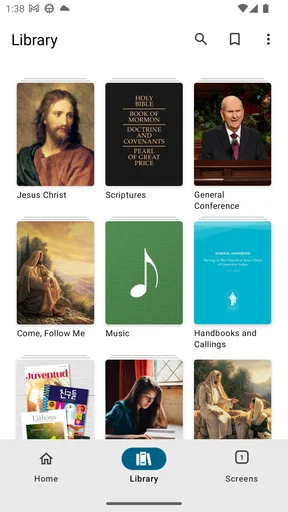
First things first, downloading and setting up the Gospel Library app is a breeze. Available on both Android and iOS, it’s just a quick trip to your app store away. Once you’ve got it installed, you’re greeted by a clean, user-friendly interface that’s intuitive even if you’re not super tech-savvy.
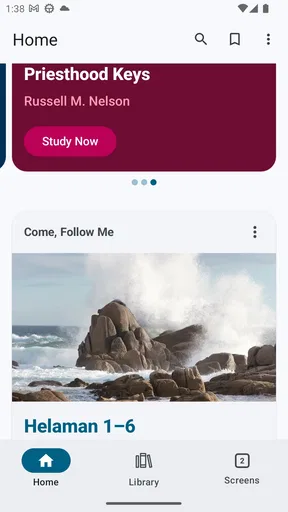
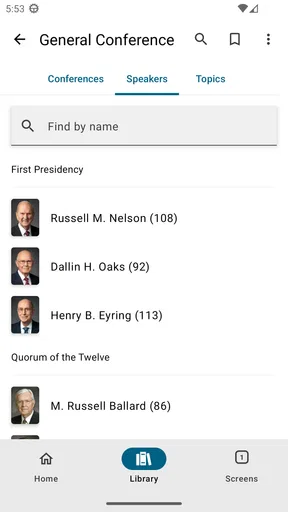
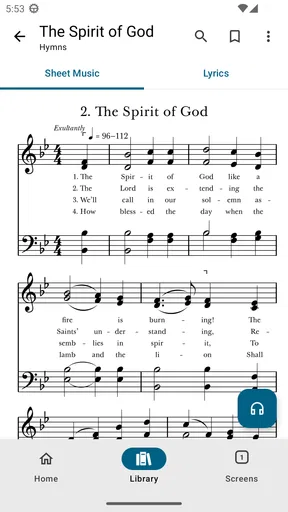
One of the first things you’ll notice is the impressive range of content. We're talking everything from the standard works to study manuals and even multimedia content like videos and music. The app does a fantastic job of organizing these resources, so you’re not overwhelmed the moment you open it.
Features That Shine
Now, let’s dive into some of the features that make this app a must-have. One standout feature is the ability to download content for offline use. Whether you’re on a plane or somewhere with spotty service, you can still get your daily dose of inspiration.
Another handy feature is the search function. It’s incredibly robust, allowing you to find specific passages, talks, or topics with ease. No more flipping through pages or scrolling endlessly!
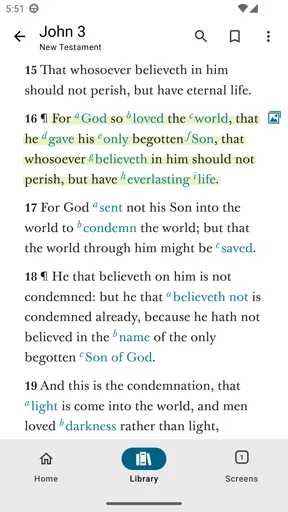
And if you’re someone who enjoys marking up your scriptures, you’ll love the annotation tools. You can highlight passages, add notes, and even bookmark your favorite sections. It’s like having a digital study journal right at your fingertips.
Personalization and Sync
Personalization is the name of the game with the Gospel Library app. You can customize the appearance to your liking, adjusting font sizes and background colors to make reading more comfortable.
The app also syncs seamlessly across devices. This means you can start studying on your phone and pick up right where you left off on your tablet or computer. It’s all about making your study experience as smooth as possible.
Multimedia and More
Now, let’s talk about the multimedia content. If you’re a visual or auditory learner, you’re in for a treat. The app includes a collection of videos, music, and podcasts that complement the textual content beautifully.
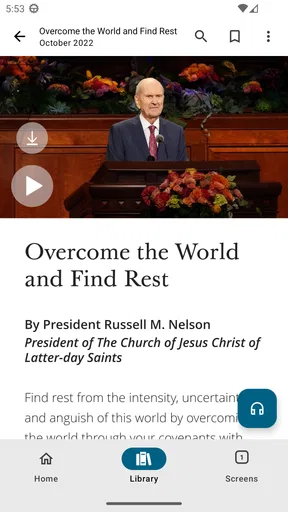
Plus, for those who love a good general conference talk, the app not only provides text versions but also audio and video options. You can listen while commuting, exercising, or even when just relaxing at home. It’s flexibility at its finest.
Community and Sharing
Another aspect I love is the sense of community. The app allows you to share passages and notes with family and friends. It’s a great way to foster discussions and share insights, making your study more interactive and engaging.
You can also participate in study groups and access lesson plans, which is perfect for Sunday School teachers or anyone preparing a lesson. It’s these little touches that make the app feel like much more than just a digital library.
There is also a practical question of which edition or resource to open when several materials seem relevant. I find it easier to begin with the passage or lesson at the center of my question, then follow the related references outward, rather than starting with a broad search and collecting more results than I can use. That keeps a study session focused and makes the library’s range feel like an advantage rather than a maze.
For note-taking, I would use highlights and annotations with a purpose: mark the lines I expect to return to, and keep comments specific enough to make sense later. A note such as why a passage matters to a lesson is more useful than a highlight with no context. This is especially helpful when preparing to share an idea with a class or family member, because it turns a saved mark into a reminder of the reasoning behind it.
The app is rated for Everyone, which makes it suitable as a family resource, though the best way to use it with children depends on what you choose to read or watch together. I would select the material in advance for a shared session instead of handing over a broad collection and expecting a child to navigate it alone. That small bit of guidance can make the phone a tool for discussion rather than another source of distraction.
If you are deciding whether it is worth trying, the basic commitment is low: Gospel Library is free, and its audience is reflected in a 4.7 average from around 231,000 ratings, with more than 10 million installs. It was released on May 28, 2010, and version 7.6.1-(761099.2944397) supports Android 6.0 and later. Those figures suggest a long-established, widely used resource, but they do not replace the more personal question of whether its Church-centered collection matches what you want to read.
The app’s strongest case is convenience across formats: a passage, a talk, study material, and related media can sit within the same study routine. Its weaker case is spontaneous use when a connection is poor and the particular item has not been prepared, or when I want a broad comparative reference library. I would keep it for regular Church study, use it deliberately for lesson preparation, and choose another tool when my main goal is cross-tradition research or a very stripped-down reader.
In the end, the Gospel Library app is more than just a tool—it's a companion for anyone looking to deepen their understanding of the scriptures and Church teachings. It’s designed to meet you where you are in your spiritual journey, offering resources and features that enhance your study experience.
So, whether you’re a lifelong member or someone just exploring the teachings, this app is worth checking out. It’s like having a spiritual toolkit right in your pocket, ready whenever you need it.
Pros
- Comprehensive scripture library available.
- User-friendly interface for easy navigation.
- Offline access to downloaded content.
- Regular updates with new materials.
- Customizable reading plans and bookmarks.
Cons
- Requires significant storage space.
- Occasional slow loading times.
- Limited multimedia content.
- Not all translations available offline.
- No dark mode for night reading.
FAQs for Gospel Library
What is Gospel Library and what can I use it for?
Gospel Library is an official app from The Church of Jesus Christ of Latter-day Saints. It offers users access to a wide range of religious resources, including scriptures, general conference talks, manuals, and other materials. The app is designed for personal study, teaching, and for enhancing your spiritual growth through organized and easily accessible content.
Is Gospel Library available on both Android and iOS platforms?
Yes, Gospel Library is available for download on both Android and iOS devices. You can find it on the Google Play Store for Android devices and the Apple App Store for iOS devices. This ensures you can access religious content on most smartphones and tablets, regardless of the operating system.
Can I access content offline with Gospel Library?
Absolutely! One of the key features of Gospel Library is the ability to download content for offline use. This means you can access scriptures, talks, and other materials even without an internet connection. It's particularly useful for those who travel frequently or have limited data access.
Does Gospel Library allow personalization of content?
Yes, Gospel Library offers extensive personalization options. Users can highlight texts, add notes, bookmarks, and even create custom study plans. These features are designed to enhance your study experience by allowing you to tailor the content to your personal preferences and study habits.
Is Gospel Library free to use, or are there any in-app purchases?
Gospel Library is completely free to download and use. There are no hidden fees or in-app purchases, making it accessible to everyone interested in exploring its vast array of religious resources. The app is a valuable tool for personal and group study without any financial barriers.


